Live · Solo · 2026
TindaBot
Tells sari-sari store owners what to buy, how many, and how much money to bring — offline, in Taglish.
TL;DR
- Problem
- Sari-sari store owners restock from memory and a notebook. Before each supplier trip they have to guess what will run out, how much to buy, and how much cash to bring — on a cheap phone, often without data.
- What I built
- An offline-first web app that turns what the owner already records (purchases, shelf counts, optional sales taps) into a shopping list with quantities, a cash estimate and a one-line “why” for every number. Cloud backup and an AI helper are optional.
- Result
- Live at tindabot.rhengtl.tech, built and validated solo: 456 automated tests, with the business rules checked against an independent Python model, and an 8× faster recompute on two years of data after profiling on a real budget phone.
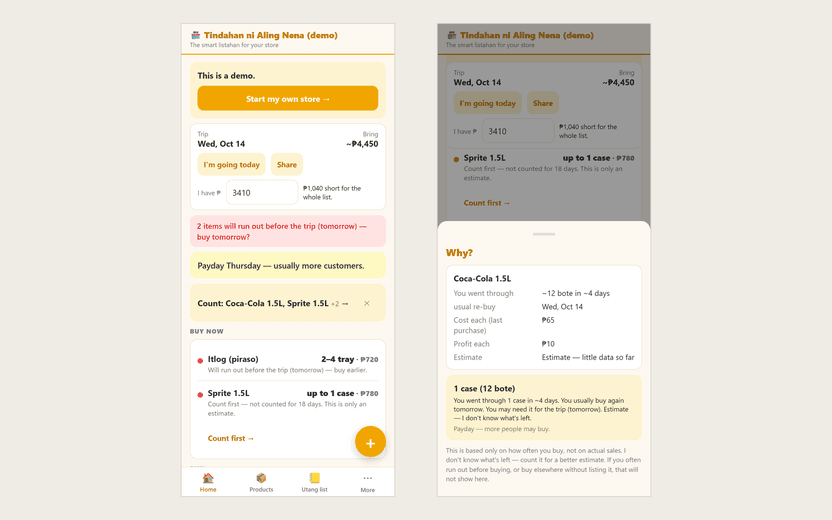
TindaBot helps a small-store owner plan the next supplier trip: what to buy, how many, and how much cash to bring, with a plain-language reason behind every number. It works offline on a budget phone, and I built it alone, from the specification to the device testing.
The problem
A sari-sari store is a neighbourhood shop, usually run from a home. Before each trip to the supplier, the owner has to answer four questions: ano ang bibilhin, ilan, kailan, at magkano ang dadalhin — what to buy, how many, when, and how much money to bring. Today that’s done from memory and a notebook, so items run out before payday and cash runs short at the supplier.
The constraints shaped every decision:
- Budget Android phones and patchy data. It has to work fully offline, with no account.
- The numbers must be explainable. An owner won’t trust “buy 3 cases” without knowing why, and an estimate built on little data has to say so.
- Taglish by default, with an English switch.
- Nothing is lost. Records are money and utang (customer credit), so corrupting them is the worst possible bug.
How it works
-
Record
Purchases, shelf counts, optional sales taps, utang and payments — each saved as an append-only event.
IndexedDB (Dexie)
-
Recompute
Pure TypeScript rules rebuild every estimate from the full event log on each change: usage rates from counts, or purchase cadence when there are no counts.
domain/ — no I/O
-
Plan the trip
Demand to the following trip, with payday and weekend multipliers, a safety buffer, urgency, pack rounding and an optional budget fit.
Shopping list + “why” sheet
-
Optional: sync
The same events back up to PostgreSQL. Row-level security limits access to store members, who can insert and read but never delete.
Supabase
-
Optional: ask the AI
Receipt photos and notes become editable drafts; questions are answered from figures looked up on the phone.
Gemini via a serverless proxy
The design choice that everything else rests on: the event log is the only source of truth. Stock levels, the shopping list, profit and every customer’s balance are derived from it on every change, never stored and patched. That makes the numbers reproducible and testable, and it means sync only has to move immutable events.
My contribution
TindaBot is a solo project. I wrote the specification (a blueprint that defines every rule the app applies), the TypeScript domain model, the independent Python reference model, the Taglish and English interface, the sync engine and database migrations, the AI proxy, and the validation on an emulator and a physical phone.
Key technical challenges
Numbers an owner can trust
The app uses two kinds of estimate. When the owner has counted the shelf, it measures real usage between counts, weighted toward recent weeks. When there are only purchases, it estimates how fast the owner goes through stock from the purchase rhythm — and is explicit that this is not sales and that it doesn’t know what’s left. Each estimate carries a confidence level, uncertain quantities are shown as a range, and every line has a bakit (“why”) sheet that explains it in plain words.
To make the arithmetic itself trustworthy, I wrote the rules twice: once in TypeScript for the app and once, independently, in Python. The Python model generates the expected values, and the TypeScript tests have to match them exactly.
Staying fast on years of data, on a budget phone
Rebuilding everything from the full event log is simple and correct, but I had only ever measured it on a small store. So I generated a fixture of 200 products, 40 customers and 19,585 events — about two years of daily use — and profiled it on a realme C55. Opening the app took 3.3 seconds, and every save froze the screen for up to 1.7 seconds.
The rule wasn’t the problem; the way it read the log was. It re-scanned the whole log once per product, and once per customer per week for the weekly summaries. Grouping the log by product and by customer once per recompute made it 2.6× to 8.3× faster (Fig. 2), with identical output — a randomized test holds the grouped path against the original one.
Trade-off, decided deliberately: opening the app still takes about 2 seconds at two years of data, mostly reading the event log from storage. I chose not to add a cached snapshot or windowed loading, because the full log as the single source of truth is what keeps the numbers trustworthy.
An AI helper that can’t corrupt the books
The AI is optional and boxed in. It drafts entries from a receipt photo or a typed or spoken note, and nothing is saved until the owner reviews and confirms. When the owner asks a question, the model calls tools that run on the phone against local data, and every number in its answer must cite the field it came from. The app checks each figure against that source and marks anything it can’t verify as unverified. The Gemini key stays in a serverless function with per-account limits of 30 requests a minute and 300 a day.
Not losing data when something goes wrong
Testing failure modes on purpose turned up a serious bug: importing a backup in replace mode ran in two steps, so an interruption between them deleted the store and left the import without its history. I made the whole import a single transaction, so an interrupted import now leaves the database exactly as it was. The same pass replaced an endless loading screen, when the browser blocks storage, with an error that says what to check and a working Try again.
Results
- Before
- After
- 60 products · 4 months (3.2k events) 37 → 14 ms (2.6×)
- 120 products · 1 year (9.8k events) 85 → 32 ms (2.7×)
- 200 products · 2 years (19.6k events) 383 → 46 ms (8.3×)
- 300 products · 3 years (29.4k events) 634 → 123 ms (5.2×)
| Measure | Before | After |
|---|---|---|
| Open the app → first cards on Home | 3,264 ms | 1,981 ms |
| Longest main-thread block (the recompute) | 1,705 ms | 433 ms |
- 456 automated tests: 431 that run offline — the business rules against the Python reference values, the local database, the sync engine against an in-memory cloud, the AI proxy and drafts, and the interface wording — plus 25 that run the sync engine and database policies against a real Supabase project with dedicated test users.
- Validated on devices, with a dated log: an Android 16 emulator and a realme C55 on Android 15, through onboarding, purchases and counts, utang, the weekly report, sign-in, sync and export.
Limitations and what I’d do next
- The estimates are only as good as the entries. Purchases alone give pattern-based estimates; counts make them accurate. The app says this in its own wording.
- Data lives in the browser. Clearing site data removes it, so the app nudges owners to export or turn on cloud backup.
- iOS hasn’t been tested, and the free database plan pauses after about a week idle (the app keeps working and syncs again when it resumes).
- Next: put it in front of real store owners for a few weeks and measure whether the list matches what they actually buy, then revisit the 2-second start-up if real stores reach that size.