Live · Team of 4 · 2025–26
ConTeX
Photograph handwriting or drop in a PDF and get LaTeX back, compiled to a PDF preview in your browser.
TL;DR
- Problem
- Turning handwritten or printed maths into LaTeX by hand is slow, and the tools that do it usually need a paid account, a local TeX install or a server that compiles for you.
- What I built
- A free web app on Cloudflare’s edge. A Worker sends each page to Gemini with a prompt the client can’t touch; the browser compiles the LaTeX itself with pdfTeX in WebAssembly, and falls back to on-device OCR when the AI is unavailable.
- Result
- Live at contex.rhengtl.tech with 1,197 automated checks across 10 suites, a 34 ms warm in-browser compile, and a pre-launch security audit that closed a prompt-injection hole and a TeX file-read bypass.
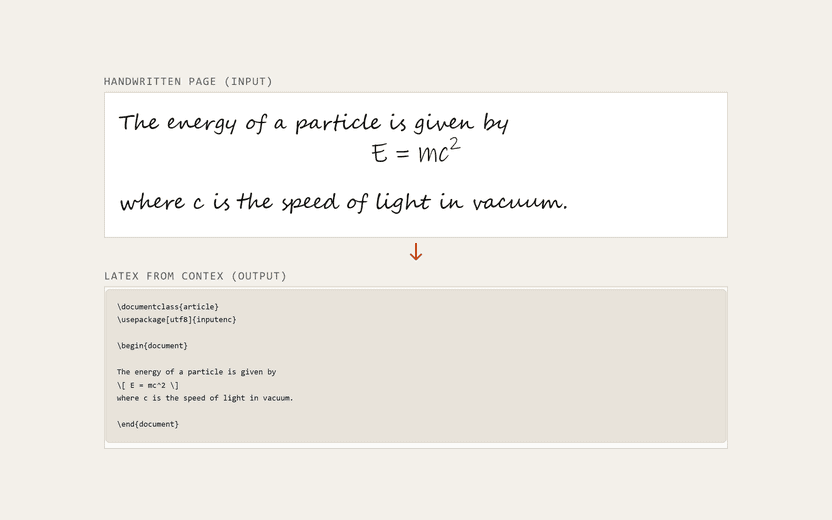
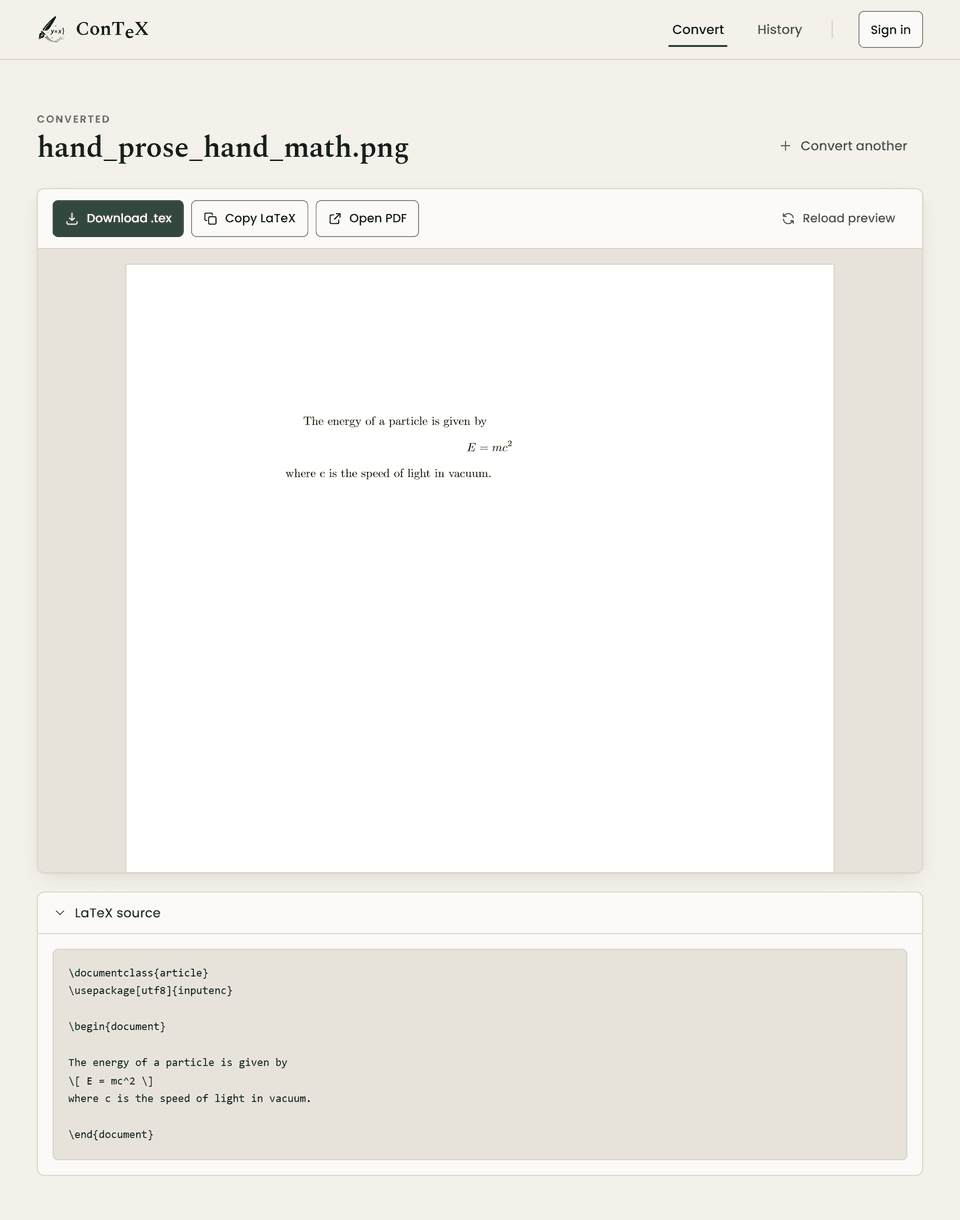
ConTeX turns a photographed or scanned page — handwriting, printed text, equations — into LaTeX, then compiles it to a PDF preview right in the browser. It began as a team project with the same four people as EarPrompt, as a Flask app deployed with Docker. This page is about the version that’s live now: I rebuilt it on Cloudflare’s edge in 2026, and every commit to that rebuild, its tests and its CI pipeline is mine.
The problem
Students and teachers write maths by hand, but documents are expected in LaTeX. Retyping a page of equations is slow and error-prone. The existing shortcuts tend to need a paid account, a heavy local TeX installation, or a server that compiles documents on your behalf.
The constraints for ConTeX:
- Free to run. It has to stay inside free tiers, including a Worker CPU budget of 10 ms per request.
- No compile server. Compiling LaTeX should cost nothing per user.
- Safe to expose. A public endpoint that calls an LLM on our key must not become a free, general-purpose LLM for anyone who finds it.
- Honest when the AI is down. If the model is unavailable, the user should still get a result, and know it was produced differently.
How it works
Browser
- Input File picker, drag-and-drop, camera or a drawing canvas; PDFs are split into single pages.
- Validate and compile Unsafe TeX is refused, then pdfTeX (SwiftLaTeX, WebAssembly) compiles against a self-hosted TeX Live subset.
- Preview pdf.js renders the compiled PDF on a canvas; the .tex downloads unchanged.
- Offline fallback Tesseract OCR and an INT8 ONNX formula recognizer, running locally — nothing is sent anywhere.
Cloudflare Worker
- Owns the prompt Takes only raw page bytes, uploads them to Gemini’s Files API and writes the whole model request itself.
- Model chain Tries a chain of models in order and keeps per-model outage records in KV.
- Sessions and history Signed session cookie, sign-in via Identity Toolkit, saved conversions scoped by user ID.
- Protection Per-caller rate limits in a Durable Object, and a strict Content-Security-Policy on every response.
Google services
- Gemini Reads the page and returns LaTeX.
- Firebase Accounts and saved history. Firestore rules deny every direct client read and write.
Two decisions explain most of the design. The heavy work runs in the browser, so there is no compile queue, no server timeout and no gigabyte-sized TeX install to host. And static assets never invoke the Worker: the TeX tree, the WebAssembly engine and the model weights are served directly by the platform, free and unmetered. A page load costs two Worker requests; an N-page conversion costs N + 1, against a free allowance of 100,000 a day.
My contribution
- The edge rebuild. I ported the Flask app to a Cloudflare Worker plus browser modules in stages. Each stage had its own parity suite against the Python version, which stayed the source of truth until the port was complete.
- In-browser LaTeX. I made the pdfTeX engine work from static hosting and built the TeX Live subset it compiles against.
- The security audit, and the fixes for what it found (below).
- Tests and delivery. The test suites, including browser end-to-end runs, and a GitHub Actions pipeline that rebuilds the model assets, runs every suite, deploys and then checks the live site answers.
Key technical challenges
A prompt injection hidden in a performance shortcut
To stay inside the 10 ms CPU budget, the Worker streamed the client’s base64 image straight into the JSON request it sent to Gemini, without reading it. Nothing checked that the body really was base64, so a client could close the JSON string, append its own instruction, and reopen it — and the result still parsed. That made the endpoint a free LLM on our key.
Scanning for quotes would have fixed it, but I measured that at 19 ms for a 25 MB upload, nearly double the budget. So I took the client’s bytes out of the JSON entirely: they’re piped as an opaque body into Gemini’s Files API, and the Worker writes 100% of the model request around the resulting file reference.
Trade-off: about 200 ms slower on a small image. In exchange, nothing the client sends is ever parsed as JSON, and uploads are 25% smaller because base64 encoding is gone.
Compiling LaTeX without a server, safely
The open-source engine hung on its first compile from any page below the site root, because it loaded its worker from a relative path. Static hosting also can’t speak the engine’s package protocol, and the engine requests fonts without file extensions. I patched the engine for the first two and generated 753 extensionless font aliases for the third.
Compiling untrusted TeX is also a security problem: TeX can read files. The audit found that the
validator’s patterns missed \openin1=..., the ordinary form, because a word boundary doesn’t fall
between a letter and a digit. Six constructs shared that hole. A second pass found that pdfTeX’s own
file primitives, such as \pdffiledump, were missing entirely; one of them typeset a test file’s
contents, as hex, into the PDF. Both were fixed in the browser validator and back-ported to the Python
version, and all 26 real benchmark documents still pass.
Moving the offline models into the browser without losing accuracy
The fallback runs two recognisers locally: Tesseract for text and an INT8 formula model (pix2text-mfr) through ONNX Runtime Web. Both had to match the Python pipeline they replaced, and both problems were found by measuring rather than by reading code.
The formula model expects images downscaled with Pillow’s bicubic filter. A canvas resize is a
different, browser-dependent filter, and a differently filtered image is a different input, so I
ported Pillow’s resampler to JavaScript. Then the first benchmark run scored 69% and looked like a
failed port. It wasn’t: the suite compared raw strings, while the benchmark’s scorer normalises
spacing (E = m c ^ { 2 } and E = mc^2 are the same answer). With the benchmark’s own scorer,
the browser port came out slightly ahead of the Python reference (Results, below). Tesseract is
the same engine compiled to WebAssembly with the same language file, self-hosted so the offline
path never contacts a third party.
Never quietly producing a worse document
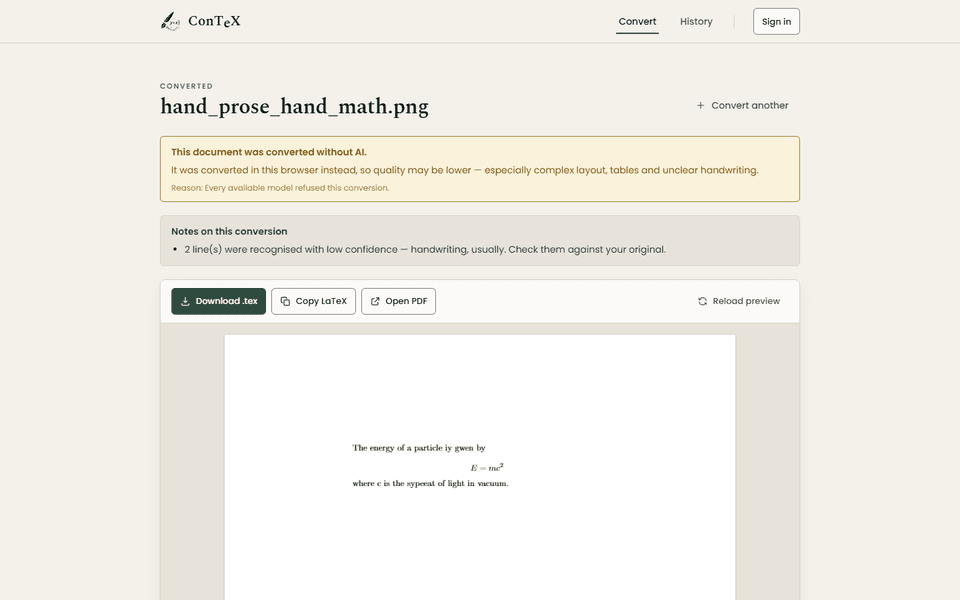
If the AI is unavailable when you press Convert, ConTeX asks before using the offline path. If the AI fails partway through a multi-page document, it finishes the remaining pages locally and says so on the result. A dedicated test drives the whole conversion against a Gemini that is down, rate-limited, or dies on page three.
Results
| Suite | Checks |
|---|---|
| Security: the Gemini endpoint cannot be steered | 165 |
| Validation and compile parity | 226 |
| Multi-page merge, byte-identical to the Python version | 211 |
| Sessions, sign-in, history and deletion | 134 |
| Guest history, end to end in a browser | 63 |
| Input: file picker, drag-and-drop, camera, canvas | 36 |
| The whole offline pipeline | 115 |
| The app end to end, through its own front door | 49 |
| Formula recogniser on the 75-image benchmark | 16 |
| Python suite | 182 |
1,197 checks in total, from the repository’s last documented run. The merge suite reproduces all 33 page groups — including the 26 real benchmark outputs merged in pairs and triples — character for character.
| Measure | Browser | Python |
|---|---|---|
| Formulas: character accuracy | 91.88% | 90.26% |
| Formulas: exact (of 75) | 62 (83%) | 60 (80%) |
| Pages: text accuracy | 96.53% | 96.53% |
| Pages: structure | 100.00% | 100.00% |
| Pages: maths | 90.49% | 77.87% |
Page scores are means over the whole fallback pipeline. The benchmark is synthetic pages with known ground truth, so these measure the port, not real-world handwriting. The maths gap is one image the browser segments into two expressions where Python merges them.
| Case | Desktop | Pixel 7 viewport, 4× CPU throttle |
|---|---|---|
| Cold compile (engine + 9.9 MB format) | 291 ms | 311 ms |
| Warm compile | 34–39 ms | 38–41 ms |
| Large document (26 pages) | 79 ms | 85 ms |
Throttling was emulated, not measured on a real low-end phone.
Limitations and what I’d do next
- The AI runs on Gemini’s free tier. The app says so before upload, because Google may use free-tier input for training. A paid tier would remove that caveat.
- The offline fallback is noticeably weaker on handwriting (Fig. 3). It’s a safety net, not a replacement.
- Some packages are deliberately absent —
hyperref,tikzandcancelaren’t in the TeX subset. The preview drops them and says which, while the downloaded.texstays exactly as the model wrote it. - The benchmark is synthetic. It proves the port is faithful, not how well either path reads real handwriting.
- Next: test on real low-end hardware rather than emulation, score the AI path on the same frozen corpus the fallback already uses, and add a set of real handwritten pages.